
 Google Scholar
Remembering memory
In high school I recall wondering how anyone would possibly be able to fully utilize 64Kb of RAM.
Fast forward to today and my K-means program produced a screen like this:
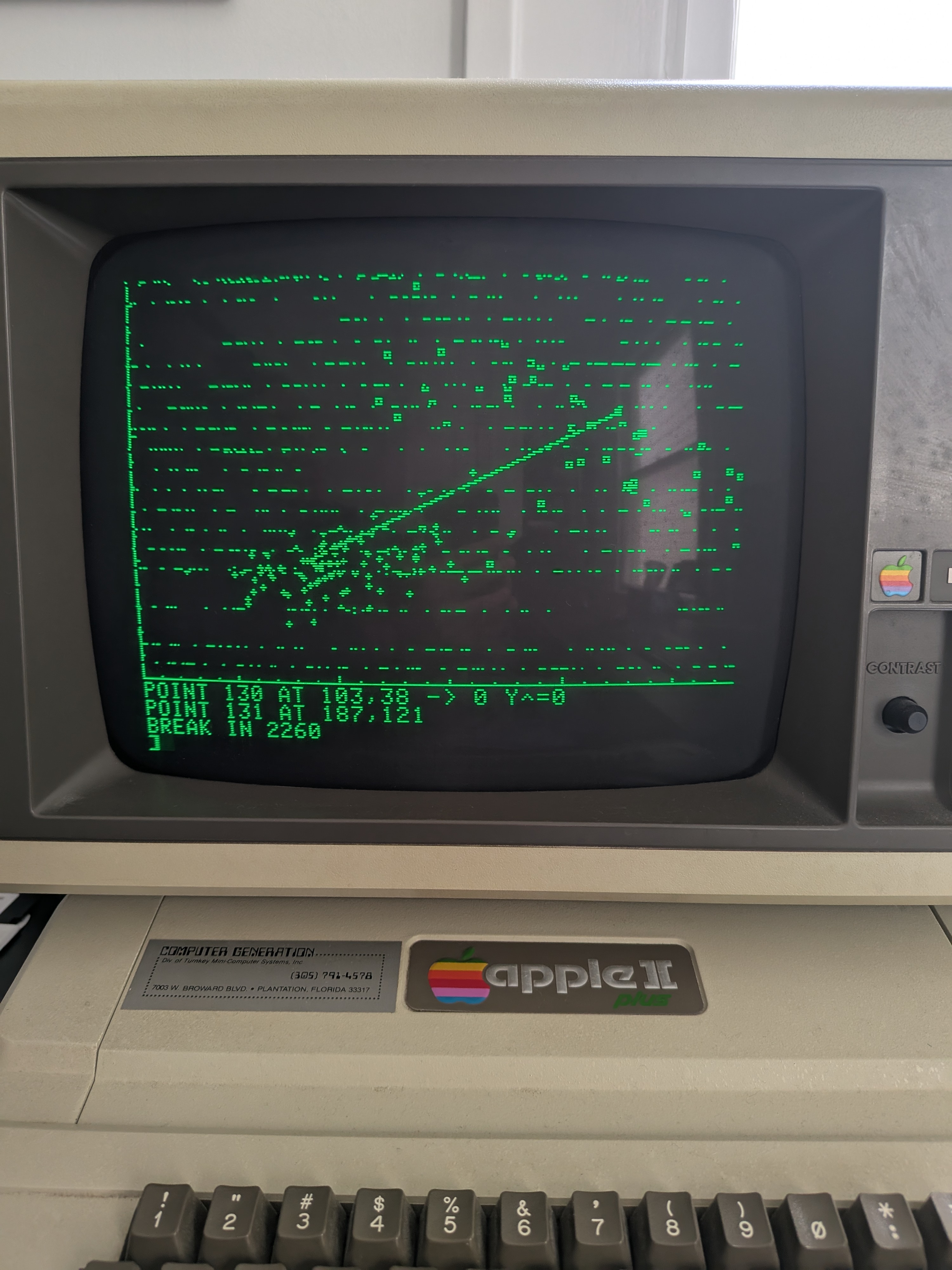
Fun. Unlike the RAM issues I had before refurbishing the machine, this issue was programmatic. In short, when increasing the number of samples in each class to something “large,” like 50, the data arrays would grow into graphics memory. What? Yes, on the Apple ][+ all the memory is contiguous.
Memory map
Here’s a “RAM Organization and Usage” map that I pulled out of the Apple ][ Reference Manual. The Apple ][+ came with 48Kb of RAM ($0000-$BFFF) on the motherboard but I have the memory expansion card, also called a language card, with an extra 16Kb ($C000-$FFFF). Using the extra memory was complicated as the 16Kb were squeezed into a 12k address space ($D000-$FFFF) by using bank switching. (I explored storing data on the language card, which would be relatively easy for integers but a nightmare for floats, but it hasn’t come to that yet.)
| Page | Hex | Usage |
|---|---|---|
| 0 | $00 | System programs |
| 1 | $01 | System stack |
| 2 | $02 | GETLN input buffer |
| 3 | $03 | Monitor vector locations |
| 4-7 | $04-$07 | 1Kb: Text and lo-res graphics (primary page) |
| 8-11 | $08-$0B | 1Kb: Text and lo-res graphics (secondary page) |
| 12-31 | $0C-$1F | 5Kb: Free RAM |
| 32-63 | $20-$3F | 8Kb: Hi-res graphics (HGR, primary page) |
| 64-95 | $40-$5F | 8Kb: Hi-res graphics (HGR2, secondary page) |
| 96-191 | $60-$BF | 24Kb: Free RAM |
| 192-199 | $C0-$C7 | I/O |
| 200-207 | $C8-$CF | I/O ROM |
| 208-255 | $D0-$FF | ROM or 16Kb language card |
In “normal” operation, a BASIC program would reside starting at $0800, right after the primary text page, and on top of the secondary text page. From the end of the BASIC program, variables and arrays would grow up. Strings, for some reasons, would reside at $BFFF and grow down. If you don’t use graphics, this gives you almost 46Kb of space. If you want to use the primary page of hi-res graphics, known as HGR, then you get only a paltry 6Kb of space for your program and variables. (This is surely an artifact of a 1977 design decision to enable HGR on machines that only shipped with 16Kb, making $3FFF the highest address in RAM.)
What you’re seeing in the image above are my data arrays growing into HGR. When the arrays are declared, everything is zero, so there’s no problem. As soon as I start writing values to the array, however, those show up on the screen. Similarly, plotting graphics on the screen has the effect of writing values into the arrays. Obviously, this is a problem.
Moving things around
A very astute observer of my last post might have noticed that I added a LOMEM statement to the very beginning of my program. This statement simply sets the bottom address for variables and arrays. Setting it to 16384, which is $4000, means my data arrays and other variables will now build from the top of HGR. The entire 6Kb space from $0800-$2000 can now be used for the BASIC program. Huge! Also, $4000-$BFFF, or 32Kb, can be used for variables, arrays and strings. This is more than enough space… for now.
Still not enough
Now that I’ve got K-means working reliably with a decent number of samples in each class, I decided to add some code to execute multiple runs so I could start comparing the results from random initializations. Here’s what I did:
10 LOMEM: 16384 : REM top of HGR
20  HOME : VTAB 21
30  GOSUB 2420 : REM Run multiple k-means
40  END

... code same as before ...

1970 PRINT "K-MEANS CONVERGED!"
1980 REM  -- clear graphics and redraw with decision boundaries --
1990 GOSUB 900: REM draw axes
2000 GOSUB 2040: REM draw samples
2010 GOSUB 2110: REM draw decision boundaries
2020 RETURN

... code same as before ...

2420 REM == Run multiple k-means ==
2430 NI = 5: REM # of iterations
2440 DIM IT(NI,1): REM store results
2450 GOSUB 900 : REM draw axes
2460 GOSUB 50 : REM generate data
2470 FOR L = 1 TO NI
2480   GOSUB 900
2490   GOSUB 2040: REM draw samples
2500   GOSUB 1320: REM run k-means
2510   IT(L,0) = A
2520   IT(L,1) = KI%
2530   PRINT "RUN "; L; ": ACC = "; A; "% IN "; KI%; " ITERS"
2540 NEXT L
2550 TEXT
2560 PRINT: PRINT "SUMMARY OF K-MEANS RUNS:"
2570 FOR L = 1 TO NI
2580  PRINT "RUN "; L; ": ACC = "; IT(L,0); "% IN "; IT(L,1); " ITERS"
2590 NEXT L
2600 RETURN
More on the analysis later, but when I first put together this code, I would get errors after the first run. Turns out the last few lines of code were being erased. Was my code running into HGR? A quick Gemini prompt gave me PRINT PEEK(175) + 256 * PEEK(176) as the pointer to track the end of the BASIC program. HGR starts at $2000 (8192) and the pointer was giving me something over 8200.
So I cut. I didn’t want to remove all of the REM statements, or even most of them, but I went through and trimmed them down. Additionally, since the Irwin-Hall Distribution was previously deemed significantly slower than the Box-Muller transform, I decided to remove that code altogether. The final result was and end address of 8032, well under HGR.
Box-Muller vs Irwin-Hall redux
In Visual Studio Code I was able to quickly spin up a separate program to compare the speeds. Unlike what I saw previously, a quick test on AppleWin showed their speeds to be almost identical. That being said, I’m sticking with Box-Muller because of its superior mathematical properties. (It generates exact, independent standard normal samples, whereas Irwin-Hall relies on the Central Limit Theorem to approximate a normal distribution. You could get away with generating fewer than 12 random normal variables in order to improve speed but performance at the tails will suffer.)
10 REM == Random Number Generation Speed Test ==

20 REM -- Box-Muller Transform vs Irwin-Hall Distribution --
30 REM -- Generate random normal variables --
40 REM -- Time measurement is not implemented...
50 REM -- ... use a stopwatch  --

60 REM -- On AppleWin Apple ][+ emulator with 1000 iterations...
70 REM --   Box-Muller takes 3m4s
80 REM --   Irwin-Hall takes 3m7s --
90 REM -- When changing the order of the subroutines...
100 REM --   Box-Muller takes 3m1s
110 REM --   Irwin-Hall takes 3m4s --
120 REM -- On the Apple ][+ hardware ...
130 REM --   Box-Muller takes 2m59s
140 REM --   Irwin-Hall takes 3m2s --
150 REM -- Conclusion: execution time is very similar --

160 PRINT "BOX-MULLER VS IRWIN-HALL SPEED TEST"
170 PRINT "RUN BOX-MULLER... BEEP AT END"
180 GOSUB 450: REM wait for keystroke
190 FOR I = 1 TO 1000
200   GOSUB 300: REM Box-Muller
210 NEXT
220 PRINT CHR$(7);
230 PRINT "RUN IRWIN-HALL... BEEP AT END"
240 GOSUB 450: REM wait for keystroke
250 FOR I = 1 TO 1000
260   GOSUB 380: REM Irwin-Hall
270 NEXT
280 PRINT CHR$(7);
290 END

300 REM == Box-Muller Transform ==
310 U1 = RND(1)
320 U2 = RND(1)
330 R = SQR(-2 * LOG(U1))
340 TH = 6.28318531 * U2: REM 2 * pi * U2
350 Z0 = R * COS(TH)
360 Z1 = R * SIN(TH)
370 RETURN
380 REM == Irwin-Hall Distribution ==
390 Z0 = -6:Z1 = -6
400 FOR Z = 1 TO 12
410   Z0 = Z0 + RND(1)
420   Z1 = Z1 + RND(1)
430 NEXT
440 RETURN

450 REM  == wait for keystroke ==
460 PRINT "TYPE ANY KEY TO CONTINUE..."
470 POKE 49168,0 : REM clear buffer
480 IF PEEK(49152) < 128 GOTO 480
490 POKE 49168,0
500 PRINT "KEY PRESSED, CONTINUING..."
510 RETURN
The REM statements above have the AppleWin results but I also transferred the program and ran on the actual hardware. The results were very similar: 2m59s for Box-Muller and 3m2s for Irwin-Hall. The emulator is impressive.
As a fun note, I tried changing the order of the two methods because I read that Applesoft BASIC implements lines of code as a linked list, so it takes longer to run lines of code that are further down.
TIL the Apple ][+ has garbage collection
While thumbing through the Applesoft BASIC Programming Reference Manual, as one is wont to do, I stumbled across FRE(expr). Since the arrays grow up in memory and the strings grow down, as noted above, this command will return the amount of memory between the two, essentially telling you how much free RAM is left. As a side effect, since changing the contents of a string does not remove the old characters (it just adds the new characters to RAM and moves the pointer) it will force Applesoft to “house clean,” freeing up additional space. Fun fact: according to the manual, expr ony exists to hold the parenthesis apart, so just plugging in a 0 is standard.
Since I’m not really using strings, garbage collection isn’t important, but I might add FRE(0) to the code just to see what’s happening. While adding the PRINT PEEK(175) + 256 * PEEK(176) trick to find the end of the program will necessitate making the program longer (by 54 bytes - I counted), I might do that, too, just for fun.
But I still want more
Since 8032 is a mere 160 bytes shy of HGR, I got to wondering if I could instead use HGR2 for graphics, which would give me another 8Kb of RAM for BASIC code, more than doubling the current amount of space. I spent way too much time trying to figure this out, but it basically won’t work if I insist on having 4 lines of text under the graphics, which comes standard with HGR. The reason is, while there’s a software switch to enabled “mixed mode” in HGR2, the 4 lines of text will actually come from the secondary page of text, which, unhelpfully, starts at $0800, which is where BASIC code begins. There are also software switches to move the starting address of a BASIC program, which can be pushed to $0C00, however, BASIC PRINT statements will still write to the primary text page. To work around this you can write text characters, using POKE, directly to the secondary page of text memory, but this starts to become way more hassle than it’s worth.
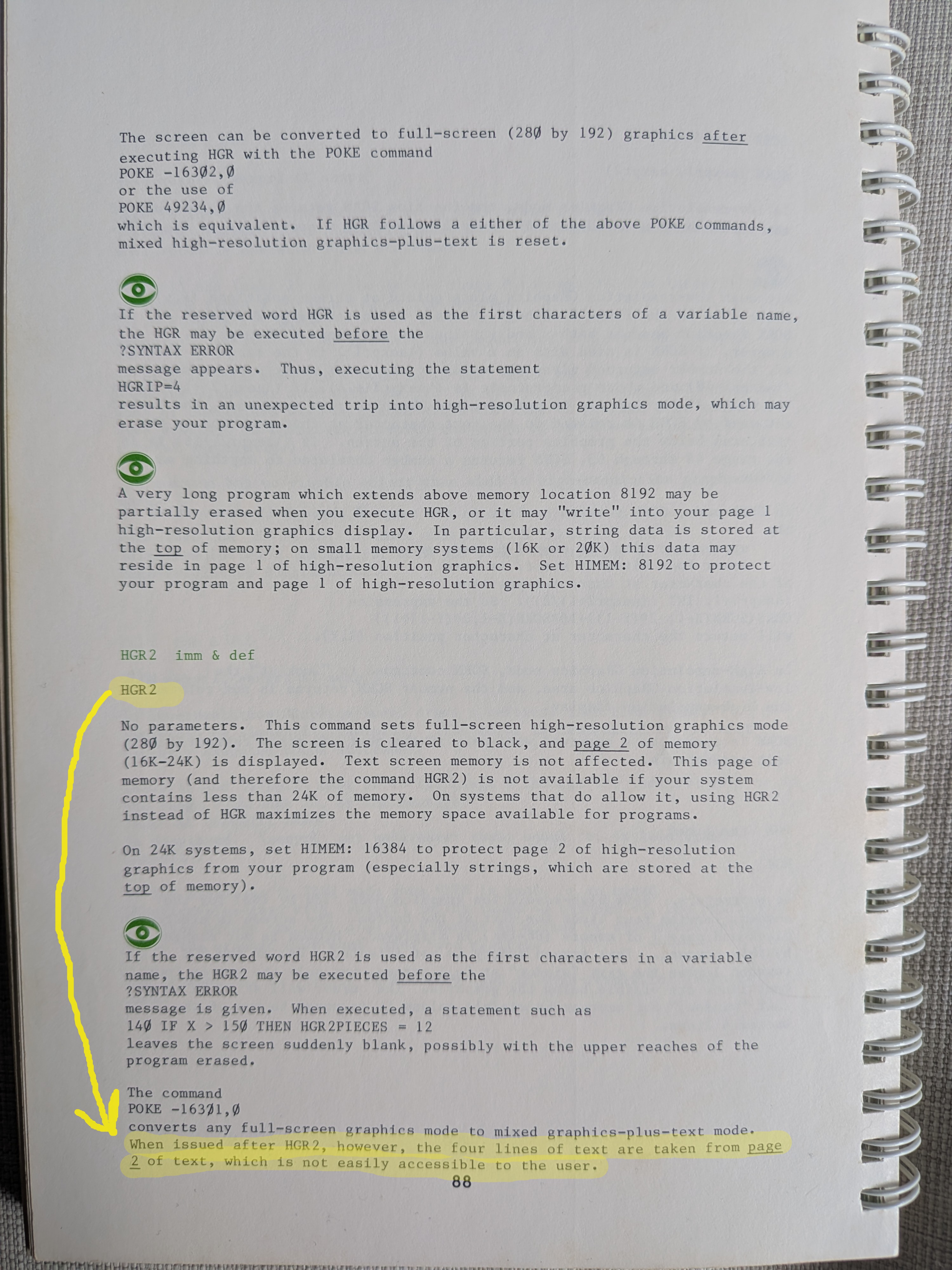
An alternative approach, which I haven’t tried yet, involves “chaining” BASIC programs. In Applesoft BASIC you can run other program by simple calling RUN "PROGRAM NAME", however, all the variables are wiped. To get around that, you have to painstakingly write the variables you want to floppy and then the next program has to load them up. This obviously take a little time and coding but it’s theoretically not far from passing parameters to a modern programming method. I could write a program called GENERATE DATA that load a few parameters from a file on the floppy and then writes the data when it’s done. That being said, calling a second program from within a loop would create special problems and everything would need to be carefully chained. Anyway, this is probably why old Apple ][+ program would frequently cause the floppy to whirl.
I’ll worry about this another day…
Leave a Comment