
 Google Scholar
Splitsville
At the end of the last post, while lamenting wanting more than 6Kb of space for an entire BASIC program, I suggested that I would look into chaining another day. Turns out, that was the next day.
Parting is not always such sweet sorrow
To spoil the suspense, I’m putting this at the top. Here’s is a special nighttime edition of my code running multiple k-means, with the data generation broken into a separate program, on the Apple ][+ hardware.
![Split code running on Apple ][+ hardware](/assets/images/apple2/split-code-on-hardware.jpg)
![More split code running on Apple ][+ hardware](/assets/images/apple2/split-code-on-hardware-2.jpg)
Chaining
The idea is relatively simple. Figure out how to break up the program into independent parts, make each one a separate program and then have them call each other so that only one of them is in memory at any given time. Ezpz. The implementation, however, gets complicated, especially when you consider that all variables are lost when loading a new program (although HGR memory persists, which could be handy, as well as any data POKEed into RAM, including the expansion memory card) and each new program will RUN from the beginning. As such, this takes planning, especially if you want to run a second program from inside a loop. All the data that needs to be saved or transferred must either be written to floppy or POKEed somewhere safe.
This level of code manipulation would have been a nightmare without Visual Studio Code. Using it, however, made things quite easy. I decided I’d start by pulling out all the code that synthesizes data points into a separate generate program. After moving over all the hyper-parameters as well as the drawing and generating routines, I added a simple routine to save the data to floppy.
1240 REM == save data to disk ==
1250 PRINT "SAVING DATA TO DISK... "
1260 PRINT D$;"OPEN DATA"
1270 PRINT D$;"DELETE DATA"
1280 PRINT D$;"OPEN DATA"
1290 PRINT D$;"WRITE DATA"
1300 PRINT NS%
1310 FOR I = 0 TO NS% - 1
1320   FOR J = 0 TO 2
1330     PRINT DS%(I,J)
1340   NEXT J
1350 NEXT I
1360 PRINT D$;"CLOSE DATA"
1370 PRINT "DATA SAVED."
1380 RETURN
In the remaining code, which I renamed from ml to k-means, I now needed a way to determine if the data was on the floppy and branch accordingly. I now start by jumping to the code below. If the file DATA exists, it’ll populate DS%(NS% - 1,3) and then RETURN. If not, INPUT NS% will throw an error and ONERR will then branch to PRINT D$;"RUN GENERATE". generate will then run, create the DATA file and launch k-means. Once the data is loaded, I proceed with multiple runs of k-means, as before.
1680 REM == Load data from disk ==
1690 PRINT "LOADING DATA FROM DISK... "
1700 D$ = CHR$(4)
1710 KN% = 0: REM find # of classes (0 indexed)
1720 ONERR GOTO 1930: REM no data
1730 PRINT D$;"OPEN DATA"
1740 PRINT D$;"READ DATA"
1750 GOSUB 1310: REM draw axes
1760 INPUT NS%
1770 PRINT NS%; " TOTAL SAMPLES IN DATA..."
1780 REM -- # --> X0, X1, Y-HAT, Y --
1790 DIM DS%(NS% - 1,3): REM data table
1800 FOR I = 0 TO NS% - 1
1810   FOR J = 0 TO 2
1820     INPUT DS%(I,J)
1830   NEXT J
1840   IF DS%(I,2) > KN% THEN KN% = DS%(I,2)
1850   X0% = DS%(I,0): X1% = 159 - DS%(I,1)
1860   ON DS%(I,2) + 1 GOSUB 1570,1620: REM plot sample
1870 NEXT I
1890 PRINT D$;"CLOSE DATA"
1900 PRINT "DATA LOADED: "; CHR$(13); "-> " FRE(0); " BYTES FREE FOR VARIABLES"
1910 POKE 216,0: REM disable ONERR
1920 RETURN

1930 PRINT D$;"RUN GENERATE"
There is now AI
It’s worth noting that I previously wrote a post about how I was (proudly) not using generative AI or an emulator. The idea was that I wanted to enjoy writing the code myself and learn from the experience. With the currently Visual Studio Code setup, however, both have become unavoidable.
Not only does it take ~5min to transfer a floppy image from my laptop to the Apple ][+, I actually need an emulator (AppleWin) to create the image. Naturally, only running on the hardware would be a missive impediment so I have taken to running updates on the emulator and then transferring to the hardware once everything is looking good.
While there might be a way to turn off the generative AI in Visual Studio Code, it’s too good to ignore. Below are three examples of the IDE predicting what I want to type next. While they’re also crazy, I found the second one to be particularly impressive. As I’m typing FRE(0), Visual Studio Code anticipates that I want to finish that line of code with ; " BYTES FREE". For it to predict this, it would have had to know, without almost no latency, the functionality of FRE(0).

Lastly, as I describe immediately below, I’ve decided to use Claude to help find bugs and optimizations. Like Visual Studio Code, it’s amazing, so I’m loath to give any of this up. That being said, moving forward I’m going to continue to do the algorithmic development by hand.
Squashing dem bugs
As I’ve been playing around with the code, I noticed that, on occasion, in between a couple k-means runs the program would randomly branch to generate and begin synthesizing new data. That struck me as odd since the only way to branch to generate is through the ONERR statement I established right before attempting to load data from the floppy. If there’s no data, the code branches to generate. Why would this be happening when there’s obviously data loaded?
Turns out, ONERR will branch on any error and so if there is any bug in the code it’ll launch generate. I decided to spin up Claude to give me a hand with this. First, it confirmed this suspicion and suggested POKE 216,0 to disable the ONERR branch. Furthermore, it suggested doing this after attempting to read data because, apparently, OPEN doesn’t fail if there’s no file (it’ll just open a new one) and thus READ won’t fail either, so the error doesn’t occur until INPUT NS. Interestingly, OPEN in ProDOS will throw a file not found but I’m using DOS 3.3.
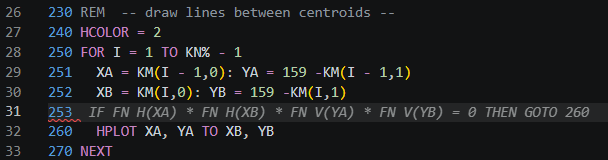
Of course, this doesn’t change the fact that apparently something else was causing an error. I was already aware of one - when drawing the line between two centroids there’s a random chance that one will be off the screen causing HPLOT to throw and illegal quantity error. I fixed this by adding a range check and just not plotting the line if this is the case. Since intermittent errors are painful to find, I asked Claude to do a deep code review for anything else and it found a couple doozies:
- Empty clusters - k-means moves each centroid to the average of the points assigned to it. Trouble is, while unlikely, due to randomness, on a given pass a cluster can end up with no points at all. When this happens the count is zero and
KM(I,0) = KM(I,0) / KM(I,2)will throw adivide by zeroerror. The fix was to just park empty cluster centroids. - Log(0) - I use the Box-Muller transform to generate random normal numbers. This involves taking the natural log of a uniform random number. Applesoft’s
RND(1)returns a value in [0, 1), which means0is a possible. In the very rare event this happens,LOG(0)will throw anillegal quantityerror. The fix is simply to draw1 - RND(1)instead, which lives in (0, 1] and so never returns0. (Update: While it’s theoretically possible forRND(1)to return a value exactly equal to0it simply doesn’t happen. I wrote a simple routine that created 10s of thousands ofRND(1)values and never saw a zero. Regardless, this is a nice patch.)
Optimizations
Before wrapping up this post, I want to point out two optimizations. The first was suggested by Claude. When drawing the decision boundary, I was checking for a vertical line to avoid a divide by zero error. Turns out, if I just set the slope to a very large number (which I was already doing) and then changed P%(2,1) to P(2,1) so that it’s values wouldn’t be capped at ±32,767, I could eliminate all of this dead code:
2360 REM  -- vertical line --
2370 P%(1,0) = P%(0,0)
2380 P%(2,0) = P%(0,0)
2390 P%(1,1) = 10
2400 P%(2,1) = 269
2410 RETURN
Since I’m now a bit obsessed with saving code space, this was a nice win.
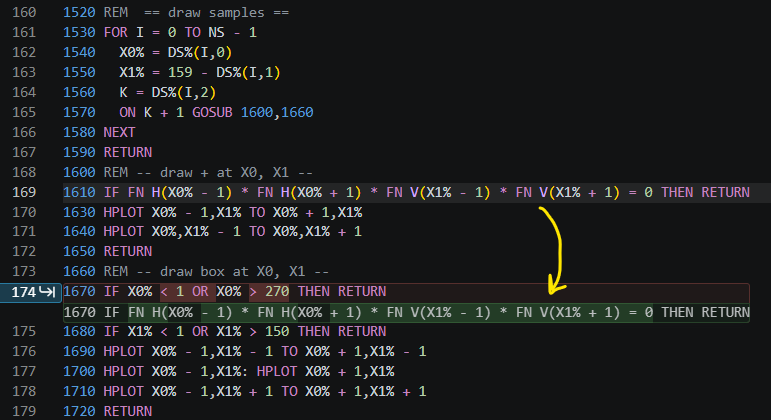
On the theme of saving space for code, the next idea came from yours truly. My range checking statements were proliferating and each of them was looking long. IF X0% < 1 OR X0% > 270 THEN RETURN and IF X1% < 1 OR X1% > 150 THEN RETURN check that a single point is on the screen prior to HPLOT in order to avoid any illegal quantity error. For a line connecting two centroids, I would need 4 checks like that, which will take up a lot of space.
I don’t recall ever using DEF FN in high school, but I came across it while flipping through the Applesoft BASIC Programming Reference Manual, for jollies, and decided to create:
DEF FN H(Z) = (Z >= 0) * (Z < 280): REM X in range
DEF FN V(Z) = (Z >= 0) * (Z < 160): REM Y in range
These two functions can now determine if a point is on the screen with a simple IF FN H(X0%) * FN V(X1%) THEN .... I now use these throughout. Assuring that an entire line is on the screen, I simply use IF FN H(XA) * FN H(XB) * FN V(YA) * FN V(YB) THEN HPLOT XA, YA TO XB, YB. Finally, checking that a 3x3 pixel object, centered around (X0%,X1%), fits on the screen, I use FN H(X0% - 1) * FN H(X0% + 1) * FN V(X1% - 1) * FN V(X1% + 1).
All of this extra RAM for code has afforded me some space to start analyzing how k-means behaves. More to come…
Leave a Comment